 BanyanDB
Metrics Providers
BanyanDB has built-in support for metrics collection. Currently, there are two supported metrics provider: prometheus and native. These can be enabled through observability-modes flag, allowing you to activate one or both of them.
Prometheus
Prometheus is auto enabled at run time, if no flag is passed or if prometheus is set in observability-modes flag.
When the Prometheus metrics provider is enabled, each BanyanDB process exposes its own metrics on port 2121.
In a cluster, the recommended setup is to let the FODC proxy aggregate every node’s metrics and scrape the proxy as the single target. Configure the following Prometheus job (replace BANYANDB_NAMESPACE with the namespace where BanyanDB is deployed, and adjust the keep-regex to match your FODC proxy pod label):
scrape_configs:
  - job_name: "fodc-proxy"
    kubernetes_sd_configs:
      - role: pod
        namespaces:
          names: ["${BANYANDB_NAMESPACE}"]
    relabel_configs:
      - source_labels: [__meta_kubernetes_pod_label_app_kubernetes_io_component]
        action: keep
        regex: fodc-proxy
      - source_labels: [__address__]
        target_label: __address__
        regex: (.*):\d+
        replacement: $1:17913
    metrics_path: /metrics
    scheme: http
The proxy adds the pod_name and container_name labels used throughout this document. Without the FODC proxy, scrape each BanyanDB pod directly on port 2121 instead and use the Kubernetes pod/instance target labels in place of pod_name.
Grafana Dashboard
Two complementary dashboards monitor BanyanDB metrics, both built for the deployment where Prometheus scrapes the FODC proxy /metrics endpoint — the single scrape target — rather than each BanyanDB pod (per-node identity is carried in the pod_name and container_name labels, so job/pod/up no longer distinguish nodes). They are split by aggregation dimension:
- BanyanDB Cluster — Nodes (FODC Proxy) — node/pod-level health and resources, aggregated by
pod_name: fleet overview (node counts, CPU/memory/disk capacity, uptime), a per-node health table, resources (CPU, RSS, system memory %, disk %, network), disk-by-path, and Go runtime. - BanyanDB Cluster — Workload (FODC Proxy) — business/data-level throughput and latency, aggregated by
group: cluster workload summary (write/query/error rate), liaison ingestion/query/publish plus write-queue (wqueue) backlog, data storage, inverted-index, and the internal queue (per-operation throughput & p99 by group).
Native
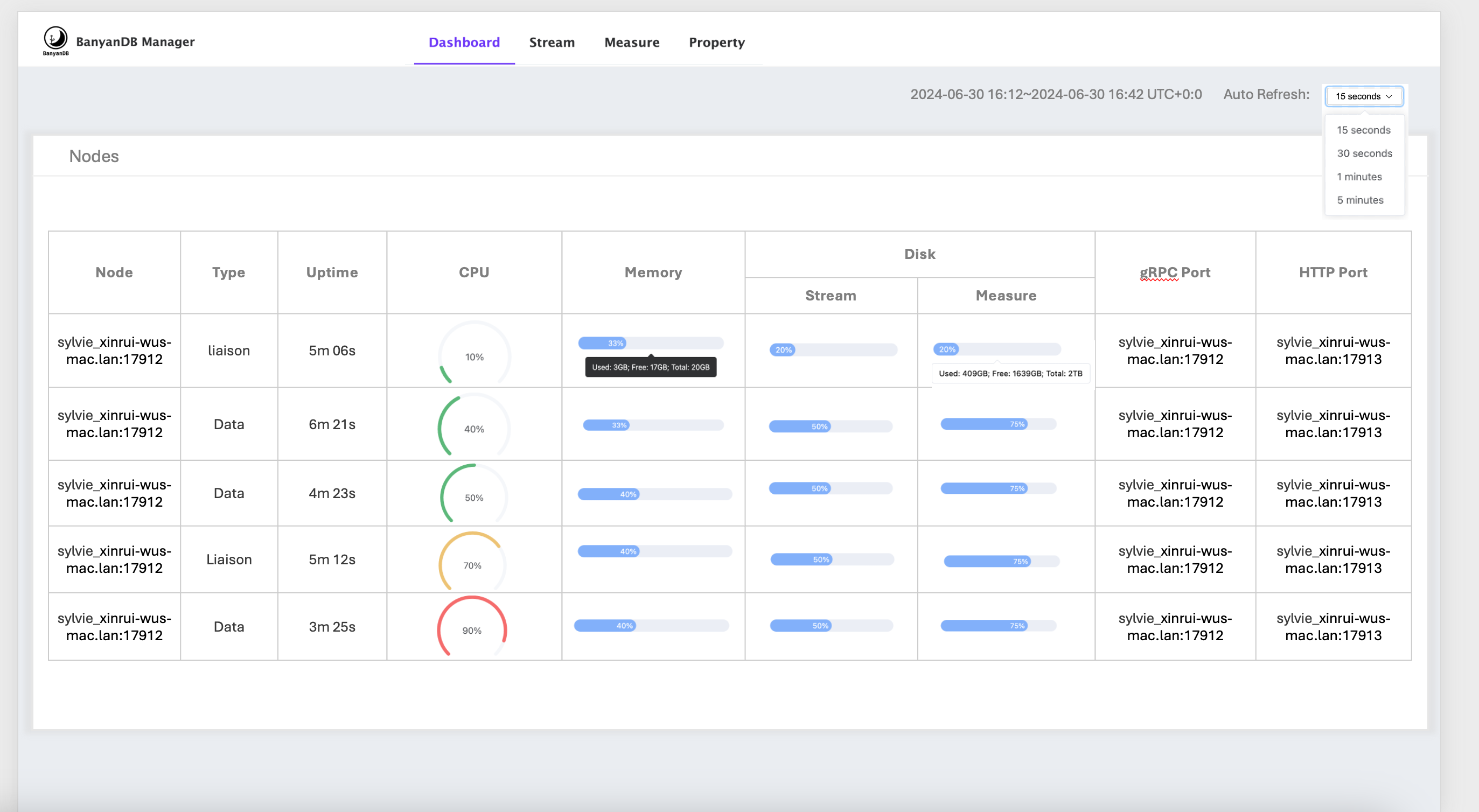
If the observability-modes flag is set to native, the self-observability metrics provider will be enabled. Some of the metrics will be displayed in the dashboard of banyandb-ui
Metrics storage
In self-observability, the metrics data is stored in BanyanDB within the _monitoring internal group. Each metric will be created as a new measure within this group.
You can use BanyanDB-UI or bydbctl to retrieve the data.
Write Flow
When starting any node, the _monitoring internal group will be created, and the metrics will be created as measures within this group. All metric values will be collected and written together at a configurable fixed interval. For a data node, it will write metric values to its own shard using a local pipeline. For a liaison node, it will use nodeSelector to select a data node to write its metric data.
flowchart LR
    subgraph localnode["Data / Standalone node"]
        lc["Native metric collectors<br/>(counters, gauges, histograms)"]
        lf["FlushMetrics (fixed interval)<br/>build InternalWriteRequest<br/>group = _monitoring, measure = metric name"]
        lp["queue.Client pipeline<br/>nodeSelector = nil → target = local"]
        ls[("Own shard<br/>_monitoring measures")]
        lc --> lf --> lp
        lp -- "TopicMeasureWrite (local)" --> ls
    end

    subgraph liaisonnode["Liaison node"]
        ec["Native metric collectors"]
        ef["FlushMetrics (fixed interval)<br/>build InternalWriteRequest<br/>group = _monitoring"]
        esel["nodeSelector.Locate(group, measure)<br/>→ select a data node"]
        ep["queue.Client pipeline"]
        ec --> ef --> esel --> ep
    end

    subgraph targetnode["Selected data node"]
        ts[("Shard<br/>_monitoring measures")]
    end

    ep == "TopicMeasureWrite (target = selected node)" ==> ts
Node selection (the liaison’s nodeSelector) resolves targets through the cluster node registry — the property-based schema registry with dns / file node discovery; etcd is no longer used.
Read Flow
The read flow is the same as reading data from measure, with each metric being a new measure.